A T4 slip, officially called the Statement of Remuneration Paid, is the annual tax document issued by Canadian employers to their employees. It summarizes all employment income earned and the corresponding deductions for income tax, Canada Pension Plan (CPP), and Employment Insurance (EI) over the calendar year. This slip is a foundational document for filing a personal income tax return, as it provides the figures the Canada Revenue Agency (CRA) uses to verify reported income. Every Canadian who has received employment income will need their T4 to complete their taxes accurately and on time.
Purpose and Legal Requirements of the T4
The T4 slip serves as the official record of the financial relationship between an employer and an employee for a given tax year. Its primary function is to report all remuneration paid and the corresponding statutory deductions withheld, ensuring both the employee and the Canada Revenue Agency have synchronized records. Employers are legally required to prepare and issue a T4 slip for any employee who meets specific criteria set by the CRA. An employer must issue a T4 if the employee earned more than $500 in the calendar year and is not on an exception list, or if the employer deducted income tax, CPP, QPP, or EI premiums from the employee's pay. The requirement to issue a T4 applies to all types of employees, including full-time, part-time, seasonal, and commissioned workers. The slip is not used for independent contractors or proprietors of unincorporated businesses, who instead receive a T4A slip for certain payments.
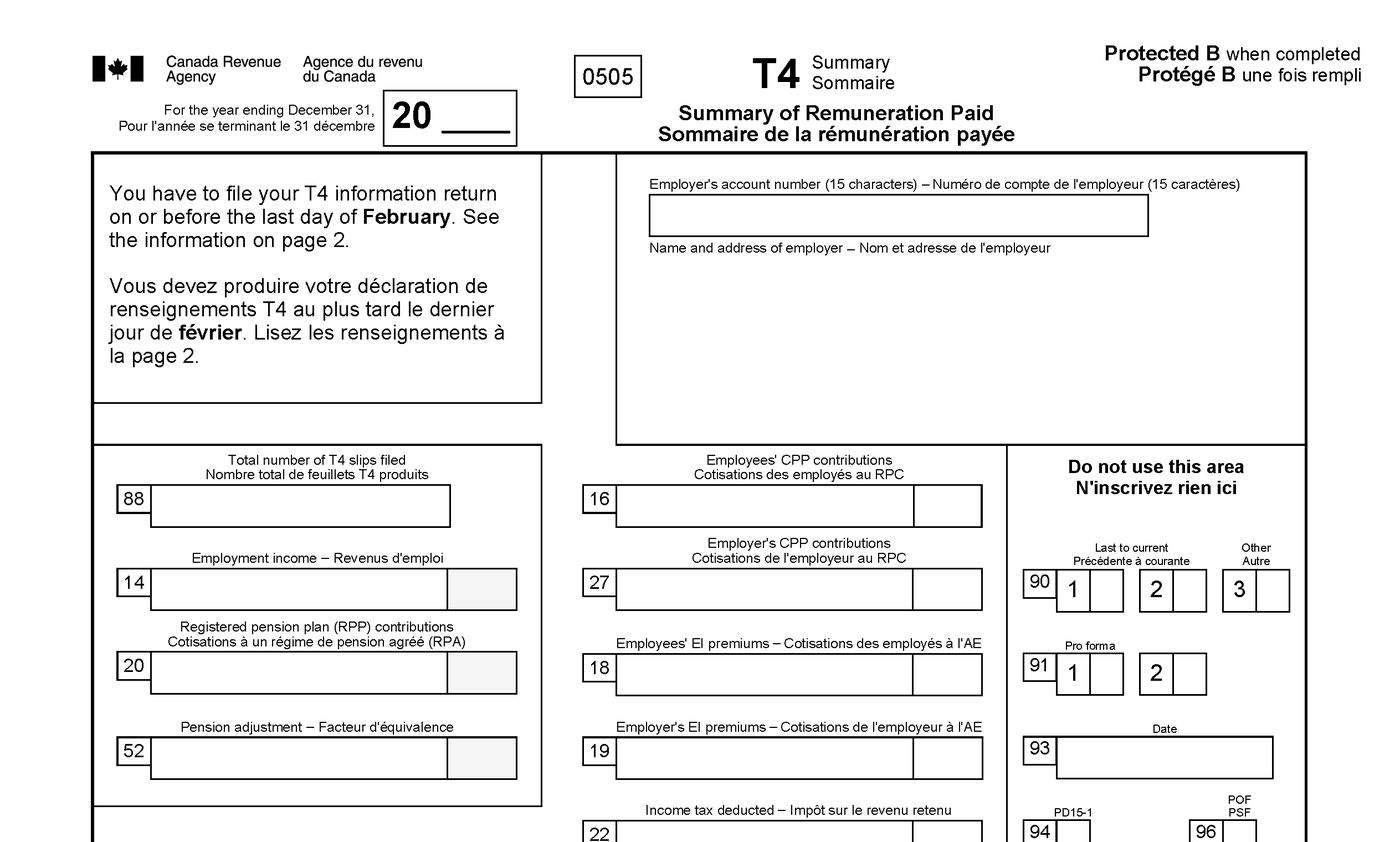
Employers must distribute the T4 slip to the employee and file an identical copy with the CRA by the last day of February following the tax year in question. This deadline is strict. For example, T4 slips for the 2025 tax year must be issued by February 28, 2026. This applies even if the employee left the company during the year. The CRA imposes penalties for late filing, which can range from $10 per day for businesses with up to 50 slips to a maximum of $7,500 for very large employers. Along with the individual slips, employers must also file a T4 Summary, a one-page form that totals the income and deductions reported on all T4 slips for the business. The CRA encourages electronic filing through its online portal, though paper filing remains an option for employers with fewer than 50 employees.
Key Components and Box Numbers
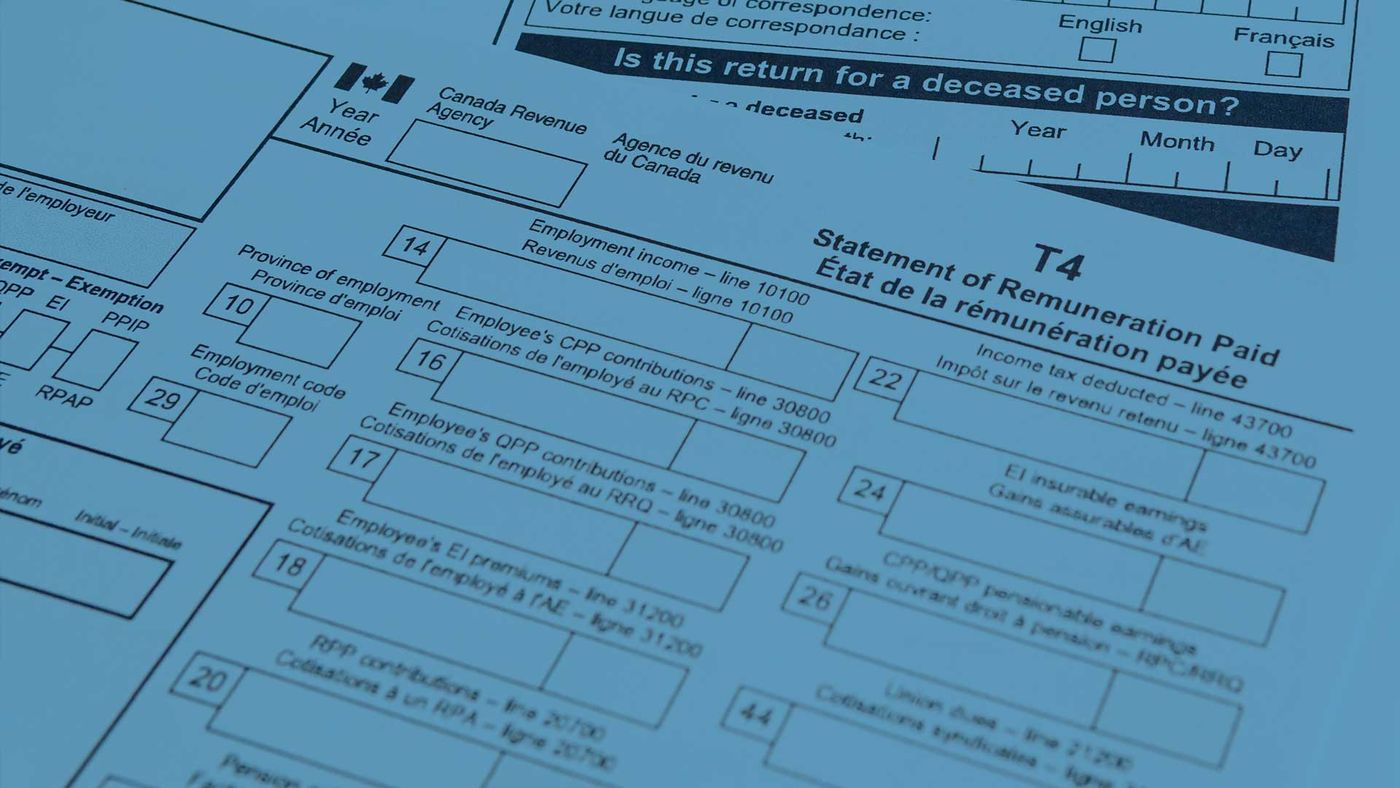
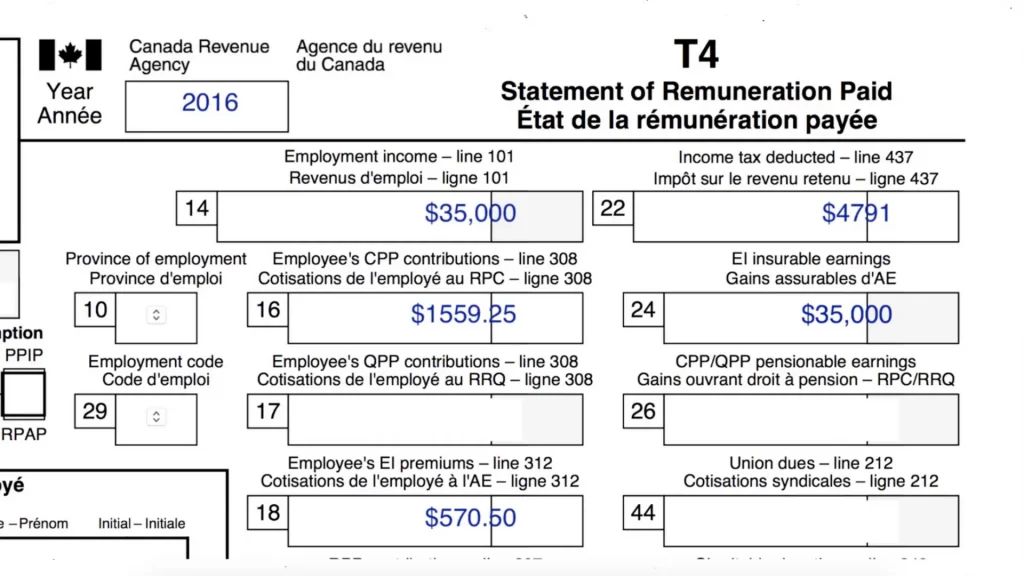
A T4 slip is divided into identification sections and a series of numbered boxes that report specific financial details. The identification area includes the employer's and employee's names, addresses, and social insurance numbers, which are crucial for the CRA to match the slip to the correct tax file. The numbered boxes provide the substantive data needed for tax filing, with each box serving a distinct purpose. The most critical box is Box 14, labelled Employment Income, which reports the total earnings before deductions, including salary, wages, bonuses, commissions, and vacation pay. Box 22 reports the total Income Tax Deducted, encompassing federal and provincial tax withheld throughout the year.
Other essential boxes detail contributions to national programs. Box 16 shows the employee's Canada Pension Plan (CPP) contributions, while Box 17 is used for Quebec Pension Plan (QPP) contributions for employees in Quebec. Box 18 reports the employee's Employment Insurance (EI) premiums deducted. Boxes 24 and 26 are supporting figures. Box 24 shows the insurable earnings used to calculate EI premiums, and Box 26 shows the pensionable earnings used to calculate CPP or QPP contributions. Box 52 reports the Pension Adjustment, which reflects the value of benefits accrued in an employer's registered pension plan and affects the employee's RRSP contribution room. The slip may also include an "Other Information" area at the bottom for reporting specific items using codes, such as union dues or tax exemptions under the Indian Act.
How to Obtain and Access Your T4 Slips
Employees typically receive their T4 slip directly from their employer by the end of February. Employers can distribute these slips in paper format or electronically, though electronic distribution requires the employee's prior consent. If you do not receive your T4 by early March, your first step should be to contact your employer's payroll or human resources department to request a copy. They are obligated to provide it. If you are unable to obtain a copy from your employer, or if you need a T4 from a previous tax year, you can access it directly from the Canada Revenue Agency. The CRA maintains copies of all tax slips, including T4s, in your personal CRA My Account, and you can view, print, or save PDF copies from the current and past years once you are logged in.
The CRA maintains copies of all tax slips, including T4s, in your personal CRA My Account. To access them, you must register and sign in to the CRA's online portal. There are three primary methods to sign in: using a CRA user ID and password, logging in through a sign-in partner like your online banking service, or using provincial credentials if you live in British Columbia or Alberta. During registration, the CRA will verify your identity using your social insurance number, date of birth, postal code, and a figure from a past tax return. For security, the CRA will mail a security code to your address on file, though you may be able to complete an instant identity check using your smartphone to bypass this wait. Once logged in, you can view, print, or save PDF copies of your T4 slips from the current and past years.
Common Errors and Correction Procedures
Errors on T4 slips, while undesirable, do occur and must be corrected to ensure accurate tax reporting. Common mistakes made by employers include entering an incorrect Social Insurance Number (SIN), misreporting the employment income in Box 14, or providing wrong amounts for CPP contributions in Box 16 or EI premiums in Box 18. Other frequent omissions are failing to report taxable benefits or deductions like union dues or Registered Pension Plan contributions. Such errors can lead to discrepancies in the employee's tax return and may trigger a reassessment or audit by the CRA.
If an employee identifies an error on their T4 slip, they should contact their employer's payroll department immediately. The employer is responsible for correcting the mistake by issuing an amended T4 slip, often referred to as a T4 slip with amended information. The corrected slip must be sent to both the employee and the CRA. Employees should wait to receive the corrected slip before filing their tax return to ensure they report the accurate figures. Employers who file late or submit incorrect information face penalties from the CRA, which provides a strong incentive for businesses to use reliable payroll software and double-check details before submission.
To maintain compliance and accuracy, employers should be vigilant about several specific pitfalls. One common mistake is entering the wrong social insurance number for employees, which is crucial for the CRA to match the T4 slip with the employee's tax return. Another frequent error is misreporting the employee's employment income in Box 14, which must include all wages, bonuses, and other payments. Employers sometimes incorrectly report CPP contributions in Box 16 or EI premiums in Box 24. Failing to report deductions such as union dues or charitable donations is another common error that can affect an employee's tax return.
- Entering an incorrect Social Insurance Number (SIN) for the employee.
- Misreporting the total employment income in Box 14.
- Incorrectly reporting the employee's CPP contributions in Box 16 or EI premiums in Box 18.
- Failing to report deductions such as union dues, RRSP contributions, or charitable donations.
- Omitting taxable benefits like the personal use of a company vehicle or employer-paid insurance premiums.
- Not filing the T4 slips and the accompanying T4 Summary by the February deadline.
Taxable Benefits and Special Reporting Circumstances
Beyond base salary and wages, a T4 slip must report various taxable benefits provided by an employer as part of an employee's compensation. These benefits are considered income and are subject to income tax, CPP/QPP contributions, and EI premiums. Common taxable benefits include the personal use of a company vehicle, employer-paid premiums for group term life insurance, and certain health and dental benefits if fully paid by the employer. Stock options and equity compensation where a taxable gain has been realized must also be reported. These amounts are typically included in the total in Box 14 and are detailed separately in Box 40, labelled Other Taxable Benefits.
Special reporting codes in the "Other Information" section at the bottom of the T4 slip are used for specific circumstances. For instance, code 33 is for medical travel assistance, code 43 is for deductions for the Canadian Armed Forces and police, and code 71 is for tax exemptions that fall under the Indian Act. There are also specific rules for certain types of workers. Taxable group term life insurance for current employees must be reported on a T4 regardless of the amount, while for former employees, it is reported on a T4A if it exceeds $50. The slip also includes Box 28 to indicate if an employee was exempt from CPP/QPP or EI premiums for the entire year, and Box 29 for codes identifying specific occupations like taxi drivers or participants in the Seasonal Agricultural Worker Program.
The types of income and payments that must be included in Box 14, Employment Income, are clearly defined. This box must show the total employment income, including wages, salaries, and bonuses that the employee received during the calendar year. It also includes other forms of income such as employment commissions and any taxable benefits. All payments made to the employee for the year must be accurately summarized in this box. Ensuring all income is included is essential for correct reporting to the Canada Revenue Agency.
- Salary and regular wages.
- Bonuses and commissions.
- Vacation pay.
- Taxable allowances, such as meal allowances paid in cash.
- The value of non-cash benefits like a parking space or gift cards.
- Taxable gains from stock options or equity compensation.
The T4 Slip Ecosystem and Related Documents
The T4 slip is the primary document for employment income, but it exists within a broader ecosystem of Canadian tax information slips. Understanding related forms helps clarify what income gets reported where. The T4A slip, or Statement of Pension, Retirement, Annuity, and Other Income, is a key cousin. It is used to report income that is not from employment, such as self-employed commissions, pension payments, retirement allowances, and fees paid to independent contractors. The T5 slip is for reporting investment income like interest and dividends. For employees, the T4 Summary is a critical accompanying document filed by the employer. It is not given to employees but is sent to the CRA to summarize the totals from all the individual T4 slips issued by that business.
When filing a personal tax return, the figures from your T4 slip are entered into the corresponding lines of your return. Many Canadians use the CRA's Auto-fill My Return service through certified tax software to streamline this process. This service securely downloads the information from the T4 and other tax slips the CRA has on file and populates the correct boxes in the tax return automatically, reducing manual entry errors. It is important to cross-reference the auto-filled data with any physical slips you have received to ensure completeness, especially if you have multiple employers or complex benefits.
The CRA provides several official methods for employers to distribute T4 slips to their employees. Employers can distribute T4 slips electronically if they first obtain the employee's consent, such as by email or through a secure online portal. If an employee does not consent to electronic delivery, the employer must provide a paper copy. Employers must give the T4 slip to employees by the last day of February following the tax year. They must also file identical copies with the Canada Revenue Agency by the same deadline.
- Providing a paper copy of the slip directly to the employee.
- Mailing a paper copy to the employee's last known address.
- Distributing the slip electronically, but only with the employee's prior consent.
Frequently asked questions
What is the difference between a T4 and a T4A slip?
A T4 slip reports income from employment, including salary, wages, and taxable benefits from an employer. A T4A slip reports other types of income not from employment, such as pension payments, retirement allowances, self-employed commissions, and fees paid to independent contractors. If you are an employee, you get a T4. If you are a contractor or receive pension income, you typically get a T4A.
What does Box 14 on the T4 slip mean?
Box 14, labelled Employment Income, is one of the most important boxes on the T4 slip. It shows your total earnings from your employer before any deductions. This amount includes your regular salary or wages, bonuses, commissions, vacation pay, and the value of any taxable benefits. You report this figure on your personal income tax return as your employment income.
What should I do if I haven't received my T4 slip by March?
If you have not received your T4 slip by early March, first contact your employer's payroll or human resources department to request a copy. Employers are required to provide T4 slips to their employees by the last day of February following the tax year. If you cannot obtain a copy from your employer, you can access a digital copy through your CRA My Account on the Canada Revenue Agency website. The CRA stores copies of all tax slips filed under your name, including T4 slips from current and past years. This online access provides a reliable method to retrieve your tax information for filing your return.
Can my employer give me my T4 slip electronically?
Yes, employers can distribute T4 slips electronically, but they must first obtain your consent to do so. If you provide consent, your employer can email the slip or make it available through a secure online portal. If you do not consent to electronic delivery, your employer is legally obligated to provide you with a paper copy of the T4 slip by the required deadline. This deadline is the last day of February following the tax year in question. Electronic distribution is a common and efficient method used by many employers in Canada.
What happens if there is a mistake on my T4 slip?
If you find an error on your T4 slip, such as an incorrect income amount or social insurance number, you should notify your employer's payroll department immediately. The employer is responsible for correcting the mistake and issuing an amended T4 slip to you. They must also file the corrected version with the Canada Revenue Agency. It is important to wait for the corrected slip before filing your personal income tax return to ensure you report accurate information. Filing with incorrect data can lead to issues such as a tax reassessment or audit.
Sources and further reading
- What Is a T4 Slip? | Rippling Glossary rippling.com
- T4 slip: what it is and how to get yours wealthsimple.com
- How to Request a T4 From the CRA? - TurboTax® Canada turbotax.intuit.ca
- T4 slip | Deel deel.com
- What is a T4 slip? A guide for Canadian employers xero.com
This article explains how things work and is not financial, tax or legal advice. Rules, limits and rates change, so check the current figures with the Canada Revenue Agency, your province or your financial institution before you act.