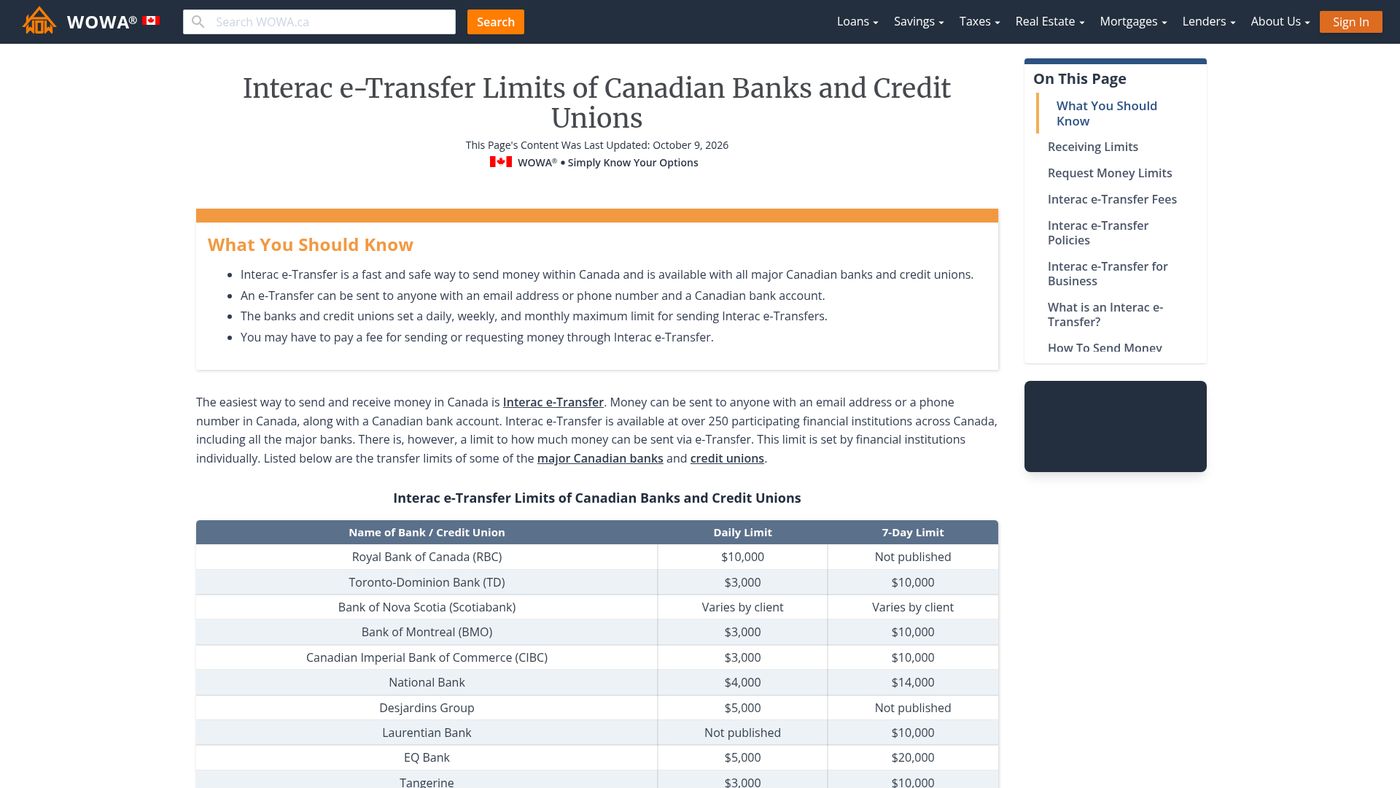
Scotiabank Interac e-Transfer limits allow customers to send up to $10,000 per individual payment. For business banking customers using ScotiaConnect, this per-transfer limit also applies, with the ability to send up to 10,000 payments at once. Personal banking customers have daily and weekly limits that can be viewed and managed through their online or mobile banking profiles. Understanding these limits is essential for Canadians planning significant transfers or managing business cash flow efficiently.
Standard Interac e-Transfer Limits at Scotiabank
The foundational limit for a single Interac e-Transfer at Scotiabank is $10,000. This applies to both personal and business banking customers. For personal accounts, this per-transfer maximum operates within broader daily and weekly transaction limits that are set on an account-by-account basis. Customers must check their specific profile to see their personal daily and weekly caps, as these are not uniform across all clients. The bank has stated there is no predefined daily or weekly maximum for the business version of the service, focusing instead on the substantial per-payment limit.
Business clients accessing the service through ScotiaConnect can utilize the full $10,000 per transfer. This enhanced limit was a direct response to client feedback regarding the frustrations caused by lower transaction ceilings in the past. The increase to $10,000 per transaction helps businesses move larger sums efficiently without needing to resort to other, slower payment methods. It is important to note that while the per-transfer limit is clearly defined, the overall transaction volume may be subject to the business's account agreements and security protocols.
How to Check and Manage Your Personal e-Transfer Limits
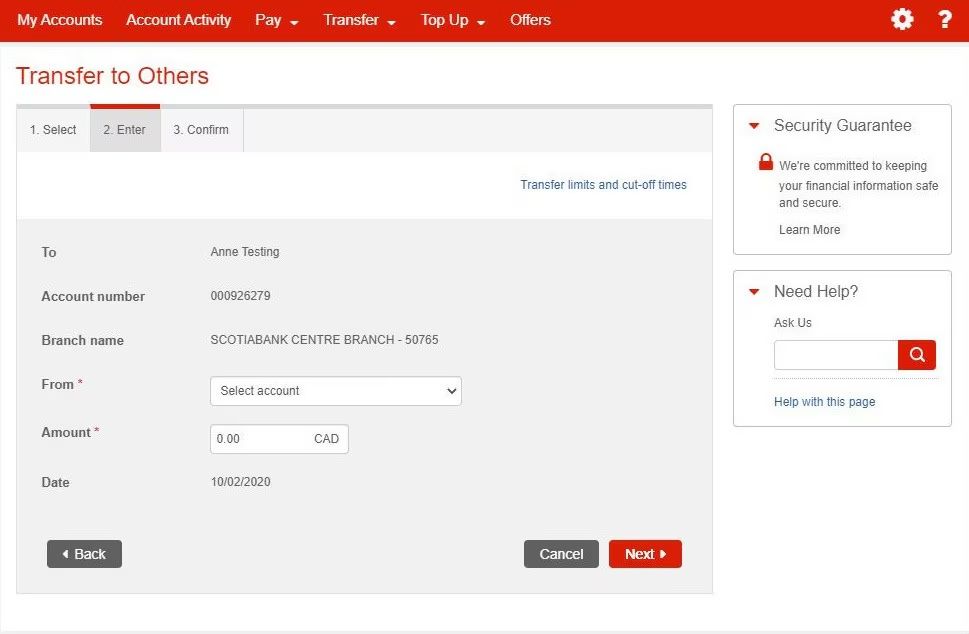
Scotiabank provides multiple digital channels for customers to view and adjust their personal Interac e-Transfer transaction limits. The process is designed to be self-serve through the bank's online and mobile platforms. Customers should start by logging into their primary banking interface, whether that is the Scotia OnLine website or the Scotiabank mobile application. From the main accounts page, the path leads to profile and settings menus specifically dedicated to transaction controls.
On the Scotia OnLine website, you need to select 'Manage My Accounts' from your Accounts page. Then go to 'Profile' and select 'Manage ScotiaCard & Account' settings where transaction limits are housed. Within the mobile app, the process begins from the home screen by selecting the 'More' option. You then choose 'Profile and settings' followed by 'Manage transaction limits' to see and modify your settings. Another method within online banking is to select 'Edit profile and settings' from the profile menu and then choose 'View transaction limits'. These menus display your current daily and weekly Interac e-Transfer maximums.
- Log in to Scotia OnLine or the mobile app.
- Go to your profile or account management section.
- Select the option for managing transaction limits.
- View your current daily and weekly Interac e-Transfer limits.
- Select the specific limit you wish to change if adjustments are needed.
It is crucial to understand that any limit changes are subject to the bank's approval and security verification. The ability to increase limits may depend on your account history, relationship with the bank, and the reason for the request. For substantial temporary increases, such as raising a daily limit to $10,000, customers are advised to contact Scotiabank directly by phone to speak with a representative. This allows for a review of the request and any necessary security steps to be completed.
Interac e-Transfer for Business on ScotiaConnect
Scotiabank launched its enhanced Interac e-Transfer for Business service on October 20, 2020, marking it as the first bank in Canada to offer this data-rich experience. This service is exclusively available to business banking customers through the ScotiaConnect digital banking platform. The primary advantage for businesses is the maintained high per-transfer limit of $10,000, which facilitates payments for larger invoices and business expenses in real time. The service was developed to address client frustrations with low limits, payment delays, and lack of payment details.
Registration for the business service is done within ScotiaConnect. After logging in, a business must register specifically for Interac e-Transfer for business and can also set up Autodeposit. Once registered, the business is ready to send and receive payments. A significant feature is the option to add invoice information and purchasing order details directly to an individual e-transfer. This data-rich capability helps businesses keep better track of payments and streamlines complex accounting and reconciliation processes, as the payment carries its own explanatory details.
The system supports sending up to 10,000 e-Transfer payments at once, which can be completed in minutes. This batch functionality is designed for payroll, mass vendor payments, or other bulk disbursement needs. When sending to a recipient who has Autodeposit enabled, funds are deposited automatically into their account without any action required on their part. For recipients without Autodeposit, the funds become immediately available once they accept the transfer. This service integrates with other ScotiaConnect features for a comprehensive business banking experience, including approving payments, checking balances, and managing EFTs and wires.
Temporary Limit Increases and Security
Scotiabank recognizes that customers may occasionally need to exceed their standard Interac e-Transfer limits for specific, legitimate purposes. The bank has a process in place to accommodate these needs through temporary limit increases. For instance, a personal banking customer who needs to send a $10,000 e-transfer in a single day but has a lower daily limit can contact Scotiabank to request a temporary adjustment. This is done by calling the bank and speaking with a customer service representative who can review and authorize the increase.
The security of Interac e-Transfer is a priority, and the system is noted for having one of the lowest rates of fraud globally due to robust fraud detection and prevention measures. The Interac network itself employs strong digital authentication and security capabilities. For business users, the enhanced data-rich payments also contribute to security and transparency by providing clear details about the purpose of each transfer. This reduces errors and makes it easier to identify unauthorized or fraudulent transactions within a business's account activity.
When requesting any limit change, customers should be prepared to verify their identity thoroughly. The bank may ask security questions or require confirmation through other channels. The temporary nature of these increases means they are typically granted for a short, defined period to complete a specific transaction. After that period, the limit reverts to its standard level. This approach allows flexibility for customers while maintaining strong controls to protect accounts from unauthorized large transfers.
Comparing Personal and Business e-Transfer Features
The core Interac e-Transfer service is available to both personal and business customers, but Scotiabank offers distinct features and limits tailored to each group. The most prominent difference is the operational platform and the associated tools. Personal customers manage their transfers through standard Scotia OnLine and the mobile app, while business customers must use the dedicated ScotiaConnect platform. Both groups benefit from the $10,000 maximum per individual transfer, which is a significant increase from historical limits.
| Feature | Business Banking (ScotiaConnect) |
|---|---|
| Per-Transfer Limit | Up to $10,000 |
| Daily/Weekly Limits | Focused on per-transfer limit |
| Batch Payments | Send up to 10,000 at once |
| Payment Details | Invoice & PO detail fields |
| Primary Access | ScotiaConnect Digital Banking |
| Autodeposit | Available |
Another key distinction is in the functionality for bulk operations. Business customers have the powerful ability to send up to 10,000 e-Transfer payments in a single batch operation, which is invaluable for payroll or large-scale vendor payments. Personal accounts do not have this batch functionality. Furthermore, the business service allows for the attachment of structured invoice and purchase order information to a transfer, turning the payment into a rich data transaction that aids in accounting. Personal transfers include a memo field, but not dedicated fields for commercial data.
Both services support Autodeposit, which allows funds to be deposited automatically without the recipient needing to answer a security question. This feature speeds up the receipt of money and enhances convenience. The launch of the enhanced business service in 2020 was part of Scotiabank's broader payments modernization journey, building on other first-to-market solutions like their integrated mobile app for business and digital security token. Personal banking services continue to evolve separately, with a focus on individual customer needs and security.
Common Questions About Sending and Receiving
Customers often have questions about the practical aspects of using Interac e-Transfer with their Scotiabank account. A frequent inquiry involves what happens when a recipient does not have Autodeposit set up. In this case, the recipient receives a notification about the transfer, typically by email, and must answer a security question to claim the funds. Once they correctly answer, the funds are deposited and become immediately available. For business senders, this process is the same unless the recipient business also uses Autodeposit.
Another area of interest is the speed of transfers. Interac e-Transfers are designed to be real-time or near real-time payments. When the recipient uses Autodeposit, the deposit is instantaneous. For non-Autodeposit transfers, the speed depends on how quickly the recipient accepts the transfer. This reliability is a key reason for its widespread adoption by Canadians and Canadian businesses.
For business users, the reconciliation process is simplified by the data-rich nature of the transfers. The ability to include invoice numbers and purchase order details means the payment information flows directly into the business's accounting records with necessary context. This reduces manual data entry and the potential for errors. It also allows businesses to keep better track of payments, knowing exactly what each transfer was for without having to cross-reference separate documents or communications.
Frequently asked questions
What is the maximum amount I can send in one Interac e-Transfer with Scotiabank?
The maximum amount for a single Interac e-Transfer at Scotiabank is $10,000. This applies to both personal and business banking customers. For personal accounts, this single transfer limit exists alongside your personal daily and weekly limits, which you can view in your online banking profile. Business customers access this limit through the ScotiaConnect platform.
Is there a daily limit for Scotiabank Interac e-Transfers?
Yes, personal Scotiabank accounts have daily and weekly Interac e-Transfer limits. The exact amounts vary by customer and account type. You must check your specific limits by logging into Scotia OnLine or the mobile app and going to your transaction limit settings. The bank has stated that for its Interac e-Transfer for Business service, the focus is on the substantial per-transfer limit rather than a strict daily cap.
What is Interac e-Transfer for Business at Scotiabank?
Interac e-Transfer for Business is a digital service for Scotiabank business customers. It is a safe and easy way to transfer funds through ScotiaConnect Digital Banking. This service allows businesses to send up to $10,000 per e-Transfer and includes the option to add invoice information to individual transfers. It was launched as Canada's first enhanced Interac e-Transfer experience for business.
How do I check my current e-transfer limits with Scotiabank?
You can check your limits through Scotia OnLine by going to your Accounts page and selecting Manage My Accounts. Then go to Profile and select Manage ScotiaCard and Account settings. In the mobile app, from the profile menu, select Edit profile and settings and then select View transaction limits. Your Electronic Transfer Limits are detailed in the Managing your ScotiaCard section.
How can I increase my Scotiabank e-transfer limit?
You can increase your personal Interac e-Transfer limit through Scotia OnLine or the Scotiabank mobile app. From the app's home screen, select More, then go to Profile and settings, and choose Manage transaction limits to select and change your limit. For a temporary increase, such as raising your daily limit to $10,000, you must call Scotiabank directly and request it. Your specific Electronic Transfer Limits are detailed in the Managing your ScotiaCard section accessible through Scotia OnLine. This process allows you to adjust your limits according to your banking needs.
Can I send multiple e-transfers at once with Scotiabank?
Yes, business banking customers using Interac e-Transfer for Business on ScotiaConnect can send up to 10,000 e-Transfer payments at once, in minutes. This enhanced online business banking feature is designed for approving and submitting payments efficiently. It is part of Scotiabank's digital business solutions that help streamline complex reconciliation processes. Personal banking customers should check their specific transaction limits through their online or mobile banking profile settings. The business service allows for data rich payments, including adding invoice information to individual transfers.
Sources and further reading
- Interac e-Transfer † for business scotiabank.com
- Send and Receive Money Faster with Scotiabank through ... scotiabank.investorroom.com
This article explains how things work and is not financial, tax or legal advice. Rules, limits and rates change, so check the current figures with the Canada Revenue Agency, your province or your financial institution before you act.