A Google Sheets budget template is a free, customizable spreadsheet used to plan and track income and expenses. For Canadians, these digital templates offer a flexible alternative to government-provided tools, allowing for detailed monthly tracking and financial goal setting without sharing sensitive banking data. They are accessible to anyone with a free Google account and can be tailored to various budgeting methods, including the popular 50/30/20 rule. Using such a template is a practical step toward organizing personal finances and monitoring spending against Canadian household guidelines.
How Google Sheets Budget Templates Work
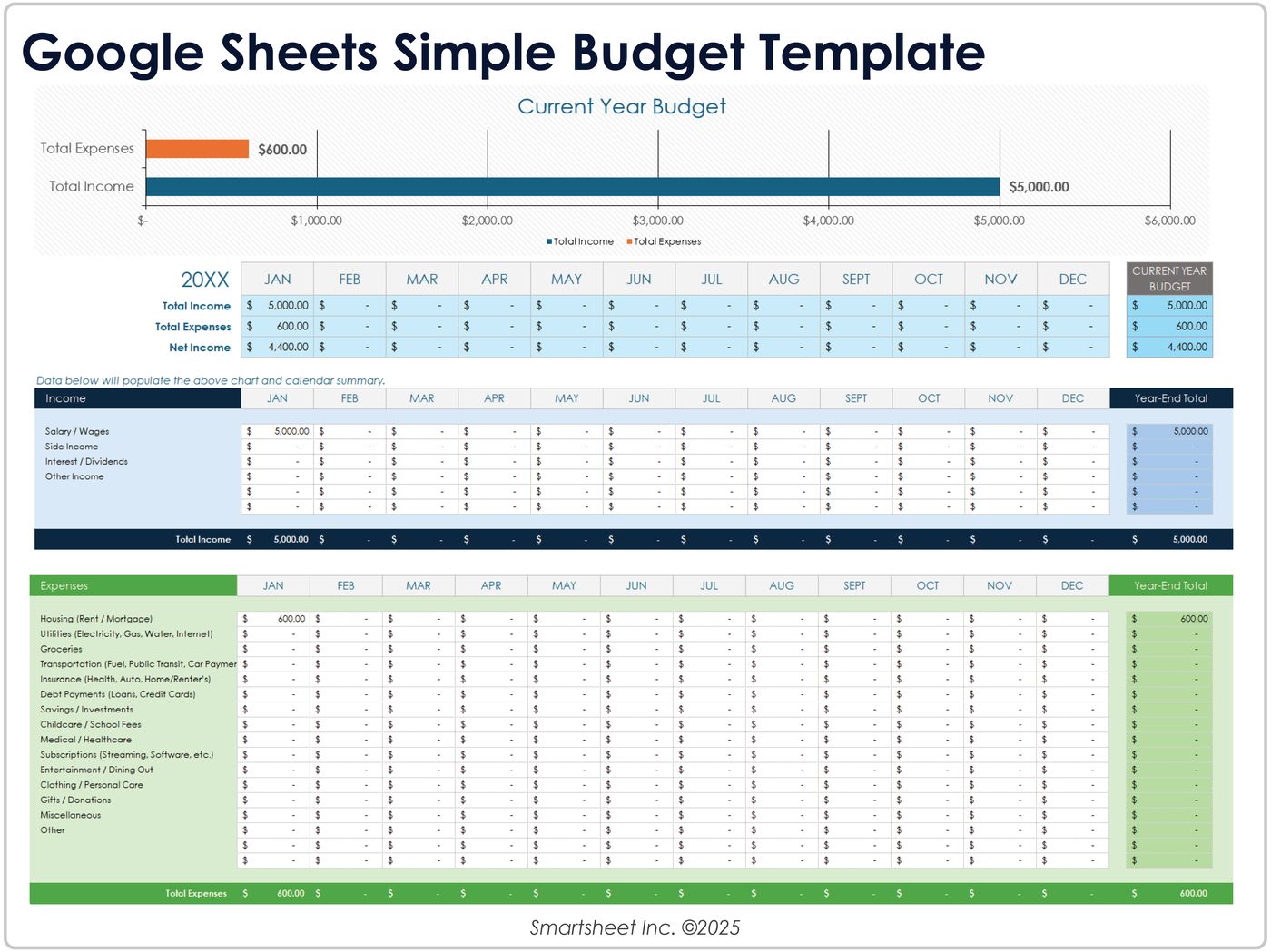
Google Sheets budget templates are pre-formatted spreadsheets designed to automate the calculation of income, expenses, and savings. Users typically acquire a template by making a copy of an existing spreadsheet into their own Google Drive, where they can then rename the file, such as by adding the current year. The core functionality involves inputting projected and actual figures into designated cells, with built-in formulas automatically calculating totals and differences. Many templates separate data into tabs for each month, which can feed into summary reports for an annual overview. Customization is a central feature, allowing users to modify categories, adjust formulas, and change colours to match their specific financial situation. This process does not require linking to bank accounts, addressing privacy concerns some Canadians have with third-party budgeting apps. The basic structure of a template often includes a main section divided into three categories: income, expenses, and savings, with a second summary section that consolidates the information to help track progress throughout the budgeting cycle.

Key Features to Look For in a Template
When selecting a Google Sheets budget template, several features enhance its utility for Canadian users. A comprehensive template should include clear sections for both projected and actual income and expenses, enabling month-over-month comparison. Dashboards or summary sections that provide a quick visual overview of financial health are highly valuable. Templates that incorporate the 50/30/20 budgeting rule automatically allocate funds into needs, wants, and savings categories. Some advanced templates offer transaction tracking with the ability to denote which account a transaction originated from, such as chequing or savings. Instructions for customization, either embedded in the template or on the download page, are crucial for users to adapt the sheet to their needs. Finally, templates designed for variable incomes, which separate regular and one-time transactions, are particularly useful for Canadians with irregular pay cycles or freelance work. Another useful feature is a built-in savings calculator for annual, emergency, and unexpected expenses, which helps prevent reliance on credit cards for irregular costs and is included in tools like the intelligent Canadian budget calculator spreadsheet.
Popular Free Google Sheets Template Examples
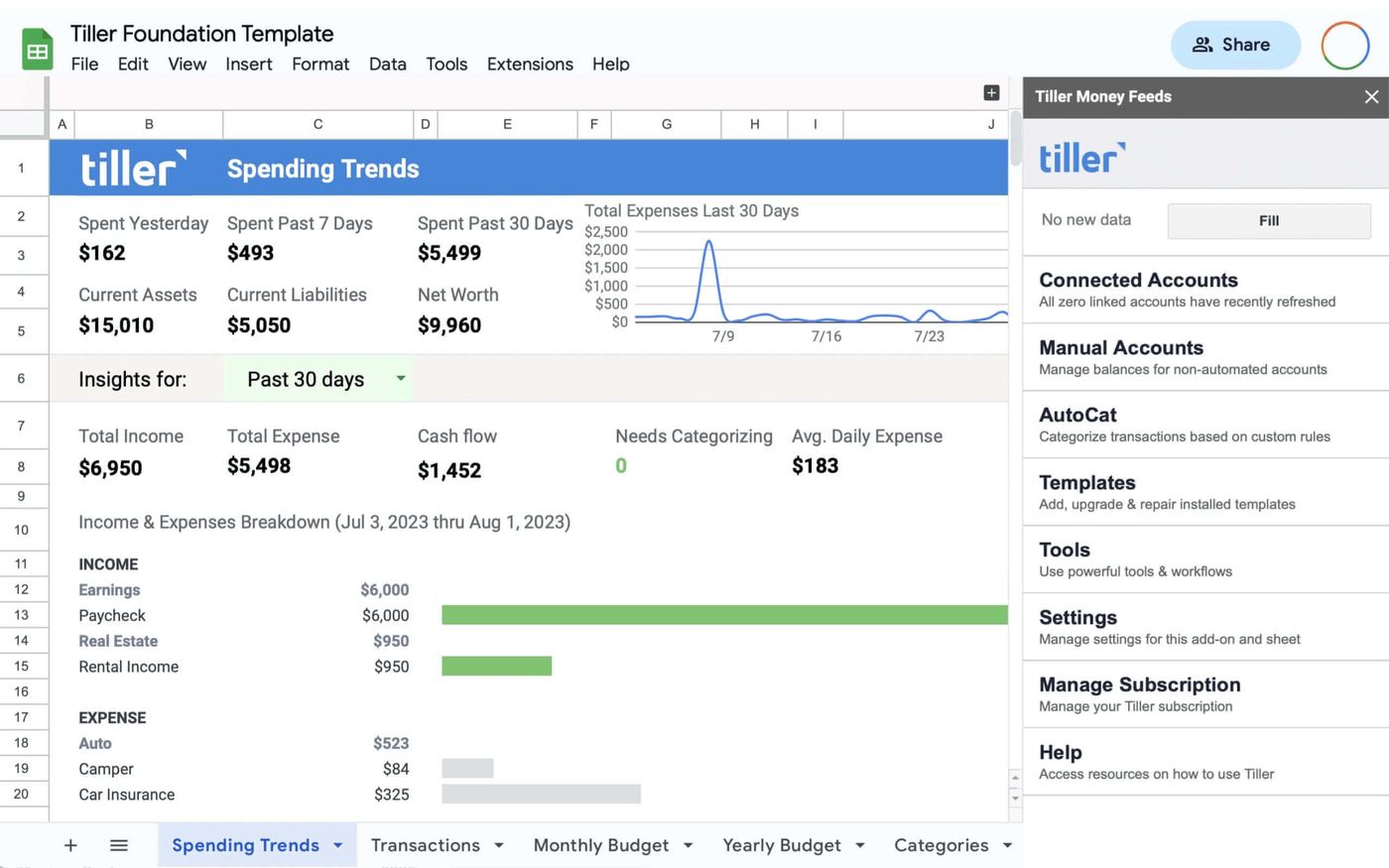
Numerous free Google Sheets budget templates are available online, each with a different focus. The native Google Sheets monthly budget template is a straightforward income and expense tracker with a customizable dashboard. The Tiller Foundation Template is a comprehensive option that automatically tracks daily spending, income, and account balances, covering all aspects of personal finances. For those new to budgeting, a popular Reddit-created spreadsheet designed for people who feel intimidated by the process has garnered significant community support with over 10,000 upvotes. The 50/30/20 Budget Calculator Template quickly allocates funds according to that specific rule with just a few clicks. For visual planners, the Monthly Budget Calendar template displays expenses on a calendar view, powered by Tiller but usable without a subscription. Another template from 20 Something Finance is uniquely designed for variable monthly budgets by breaking down income and expenses into regular and one-time transactions. Additional notable templates include a transaction tracker with clear modification instructions and a savings budget spreadsheet based on the envelope/rollover savings concept, as well as a template inspired by concepts from the personal finance book I Will Teach You to Be Rich.
Comparison with Official Canadian Budgeting Tools
Canadians have access to several official budgeting tools, which differ from third-party Google Sheets templates in their design and data handling. The Government of Canada's Budget Planner is an online tool that lets users input budget information and auto-fills a template, with the budget period covering one month. The government also provides a downloadable interactive budgeting template module that can be used independently. These official tools are often used in conjunction with credit counselling sessions, where a completed budget is reviewed with a counsellor, and the template can be filled out electronically and emailed or printed for discussion. In contrast, Google Sheets templates are entirely user-managed and stored privately in an individual's Google Drive. While government tools offer standardized guidance, Google Sheets templates provide greater flexibility for customization and ongoing tracking without the need to export or print documents for review. Both approaches aim to help users create a customized budget, but the Sheets method places full control and responsibility for data security with the individual. Other Canadian organizations like Consolidated Credit Canada and Credit Canada also offer free downloadable budget templates, which require making an account but are positioned as easy-to-use tools for tracking income, credit card debt, and expenses.
Steps to Implement and Customize a Template
Implementing a Google Sheets budget template involves a series of steps to ensure it functions correctly for your financial picture. First, locate a suitable template and use the 'Make a copy' function to save it to your own Google Drive. Immediately rename the file to something identifiable, like 'Household Budget 2026'. Next, review all the pre-set categories for income and expenses, such as salary, mortgage, utilities, and savings, and modify them to reflect your specific inflows and outflows. You may need to add or delete rows to accommodate all your accounts and spending categories. Input your starting figures, typically beginning with your monthly after-tax income. As you begin tracking, enter your actual expenses regularly, ensuring data is placed in the correct cells for formulas to calculate variances automatically. Finally, set up any additional tabs or summary reports you wish to use, such as an annual overview that pulls data from each monthly sheet. The process requires hovering over items in some templates to view short descriptions and carefully replacing placeholder cell values with your personal financial information.
Common customizations for a Google Sheets budget template include renaming the file for a new year and adjusting the template to track spending in a preferred way. Users can set up separate sheets for different accounts or add columns to categorize transactions by account. Many templates provide instructions for customization either on the download page or within the spreadsheet itself. The Government of Canada's downloadable interactive budgeting template also allows users to add personal budget information as they proceed through the module.
- Adding a column to select which bank account a transaction came from.
- Creating separate sheets for each month that link to a master summary.
- Adjusting the colour scheme for better visual organization.
- Incorporating Canadian-specific expense categories like RRSP contributions or GST/HST.
- Building in alerts or conditional formatting to warn when a spending category is over budget.
- Adding a savings calculator for annual or emergency fund goals.
- Modifying the template to work with a bi-weekly pay cycle instead of a monthly one.
After customization, the ongoing process involves consistent data entry and monthly reviews of the difference between projected and actual amounts. Users should transfer monthly totals to an annual budget template to see a broader financial view. At the end of the year, archiving the file allows for a fresh budget start. If a template does not work, it is recommended to treat it as a learning experience and then seek a different budgeting method, potentially discussing options with a financial counsellor as suggested by the Government of Canada's module.
Privacy and Security Considerations for Canadians
Using a Google Sheets budget template involves important privacy and security considerations distinct from connected budgeting apps. The primary advantage is that templates do not require read-only access to your bank accounts, meaning you are not disclosing passwords or PINs to a third party. Depending on your financial institution's debit card holder agreement and electronic banking terms and conditions, sharing such credentials with a third-party app may violate your agreement. With a spreadsheet, you manually enter transaction data, maintaining full control over your financial information. The security of your budget then depends on the security of your Google account and your own device. It is your responsibility to download the template, use it on your laptop or PC, and save it securely within your Google Drive. This method ensures your sensitive spending data is not stored on or analyzed by external servers, though it requires more manual effort than automated tracking solutions. For individuals concerned about divulging too much information, this offline-style approach within a secure cloud drive offers a balanced solution that aligns with the warnings from resources funded in part by the Government of Canada about the accessibility of external content.
Integrating Canadian Financial Guidelines
Some advanced budget templates integrate general Canadian financial guidelines to help users benchmark their spending. These guidelines, often based on aggregated data from tens of thousands of credit counselling appointments, suggest how Canadians might allocate their after-tax income to avoid debt. While there is no 'normal' budget, these guidelines provide a comparative framework. A template may include prefilled menus or sections that reference common spending ranges for categories like housing, transportation, and food as a percentage of income. As you input your numbers, the template might generate alerts if your expenses in a category are significantly higher or lower than these typical ranges. This feature acts as a budgeting assistant, offering suggestions to help build a solid financial plan. It is important to remember these are guidelines, not rules, and a template should remain customizable to fit individual circumstances, which can be further discussed with a financial advisor or credit counsellor. The intelligent Canadian budget calculator spreadsheet, for example, warns users if expenses are too high or low and looks for dozens of opportunities to improve the budget and save money after the budget is completed.
Common Mistakes and How to Avoid Them
When using a Google Sheets budget template, several common mistakes can undermine its effectiveness. A frequent error is not customizing the template's default categories to match actual spending habits, leading to inaccurate tracking. Users should thoroughly review and rename all income and expense lines before entering any data. Another mistake is inconsistent data entry. Budgeting requires regular updates, ideally weekly or bi-weekly, to capture all transactions. Failing to account for non-monthly expenses, like annual insurance premiums or holiday gifts, is a major oversight that can be avoided by using the template's savings calculator or creating a separate category for irregular costs. Users sometimes misunderstand the formulas and accidentally overwrite them, which can be prevented by familiarizing themselves with the template's instructions or locking formula cells. Not backing up the spreadsheet or using a clear naming convention for annual files can lead to data loss or confusion. Finally, becoming discouraged if the first template doesn't fit is a mistake. The process is a learning experience, and trying a different template or method is a valid step toward finding a system that works, as emphasized in the Government of Canada's budgeting module which advises users not to give up if the provided template does not work for them.
When to Seek Additional Financial Help
While a Google Sheets budget template is a powerful self-management tool, there are circumstances where seeking additional help is advisable. If creating or sticking to a budget feels overwhelming, particularly after a major life change like a brain injury or job loss, reaching out to a financial advisor at your bank or a non-profit credit counselling organization is recommended. These services are often free and confidential. The Government of Canada's budgeting module is designed to be completed and then discussed in an in-person counselling session, indicating the value of professional review. If a template consistently alerts you that your expenses are too high relative to your income, or if you are dealing with significant debt, professional credit counselling can provide structured guidance. Non-profit credit counselling organizations offer money coaching and can help explore all options for getting out of debt. While a template can automate calculations and offer guidelines, it cannot replace personalized advice for complex financial situations or provide the accountability and support that a counselling session offers. Speaking with a qualified credit counsellor is a free and confidential service that can complement the use of any budget spreadsheet.
Frequently asked questions
Are Google Sheets budget templates truly free to use?
Yes, Google Sheets budget templates are free. They require only a standard Google account, which is also free to create. The templates themselves are typically shared by creators at no cost, and Google Sheets as a platform does not charge for basic spreadsheet functions. You may encounter premium templates or services like Tiller that offer additional features for a fee, but a wide array of fully functional, free templates are available from sources like Google's native offerings, Reddit, and personal finance blogs.
How do I get a Google Sheets budget template into my account?
You acquire a template by finding a shared template online and selecting the 'Make a copy' option. This action saves a copy of the spreadsheet directly into your own Google Drive. Once copied, you can rename the file to something relevant, like 'Family Budget 2026'. The template is then fully editable and private to your Google account, ready for you to customize with your income and expense categories. Many template pages provide explicit instructions for this copying process to ensure users successfully import the tool.
Can I use these templates on a Mac or iPhone?
Google Sheets is a web-based application accessible through any modern browser on devices including Windows PCs, Macs, iPhones, and Android phones. As long as you have an internet connection and are signed into your Google account, you can open and edit your budget spreadsheet. The functionality is consistent across platforms, though the interface may adjust slightly for mobile screens. Some templates are also available in formats compatible with other software, such as Excel or Numbers for Mac, but the Google Sheets version is universally accessible.
What is the advantage over the Government of Canada Budget Planner?
The primary advantage is customization and ongoing control. While the Government of Canada Budget Planner is a useful tool for creating a one-time budget, a Google Sheets template is a living document you own and can modify endlessly. It allows for detailed monthly tracking, complex formulas, and integration of your own reporting formats. It also does not require you to submit any data to a government portal, keeping all information within your personal Google ecosystem. Furthermore, Sheets templates can be designed for specific budgeting methods like zero-based budgeting or envelope savings, offering more variety than the standardized government tool.
Do I need to know how to use formulas in Google Sheets?
No, advanced knowledge is not required. Most budget templates come with all necessary formulas pre-installed. Your role is to input your numbers into the correct cells for income and expenses. The template automatically calculates totals, differences, and percentages. Some templates include instructions for basic customization, such as adding rows, which typically involves simple steps like inserting a row and copying a formula. However, a basic understanding of how to use a spreadsheet, including selecting cells and entering text or numbers, is beneficial for effective use.
Is my financial data safe in a Google Sheets budget template?
Your data's safety is primarily governed by the security of your Google account and your own practices. Since you manually enter data and the template does not connect to your bank accounts, there is no risk of a third-party app breaching your banking agreements. The spreadsheet is stored in your Google Drive with the same protections as any other Google document. You enhance security by using a strong password for your Google account and enabling two-factor authentication. The template itself is as secure as you make it, with no external permissions required to function.
Sources and further reading
- Free budget template spreadsheets to customize excel.cloud.microsoft
- Make a budget using one of these templates braininjurycanada.ca
- Our 11 Favorite Free Google Sheets Budget Templates For ... tiller.com
- Budgeting template ised-isde.canada.ca
- Intelligent, Free Excel Budget Calculator Spreadsheet mymoneycoach.ca
This article explains how things work and is not financial, tax or legal advice. Rules, limits and rates change, so check the current figures with the Canada Revenue Agency, your province or your financial institution before you act.