A salary calculator is an online tool that estimates your net income after all payroll deductions. For Canadian workers, this means calculating federal and provincial income taxes, Canada Pension Plan or Quebec Pension Plan contributions, and Employment Insurance premiums. Understanding your take-home pay is essential for budgeting, financial planning, and evaluating job offers. These calculators use the latest tax brackets and contribution rates, such as those in effect for the 2026 tax year, to provide a personalized snapshot of your earnings.
How a Canadian Salary Calculator Works
A salary calculator converts your gross income into net take-home pay by applying Canadian payroll deductions. The core calculation starts with your annual salary or hourly wage. It then subtracts federal income tax, provincial or territorial income tax, Canada Pension Plan or Quebec Pension Plan contributions, and Employment Insurance premiums. The result is your estimated after-tax income. These tools use the specific tax brackets, rates, and contribution limits for the selected tax year, such as 2026. They also incorporate standard non-refundable tax credits like the basic personal amount and the Canada employment amount. The calculator provides a detailed breakdown of each deduction, helping you understand exactly where your money goes before it reaches your bank account.
The accuracy of the estimate depends on the inputs you provide. The most critical inputs are your gross income, your province or territory of residence, and the tax year. The calculator uses your province to determine the correct provincial tax brackets and any provincial programs like the Quebec Parental Insurance Plan. The tax year selection ensures the tool applies the correct federal brackets and updated contribution limits for CPP, EI, and RRSPs. Many calculators also allow you to input your weekly work hours and paid time off to refine the conversion from an hourly wage to an annual salary. These inputs collectively determine your final net pay and effective tax rate.
Key Inputs and Their Impact on Your Net Pay
Your gross annual income or hourly wage is the starting point for all calculations. Entering a higher gross income increases your tax liability and moves you into higher federal and provincial tax brackets, which reduces the percentage of each additional dollar you keep. If you enter an hourly wage, the calculator multiplies it by your weekly hours and weeks worked per year. A standard full-time year is 2,080 hours, which is 40 hours per week for 52 weeks. Changing the weeks per year input significantly affects your annual salary calculation. For instance, selecting 50 weeks assumes two weeks of unpaid time off, lowering your annual gross pay compared to a full 52-week year.
Your province or territory of residence is perhaps the most impactful input after income. Each province sets its own tax brackets, rates, and basic personal amounts. Alberta, for example, has a high basic personal amount and no provincial sales tax, which generally results in higher take-home pay for middle and high-income earners. Quebec has its own pension plan and parental insurance system, leading to different deduction rates. Selecting the correct province ensures the calculator applies the right provincial tax table and the appropriate rates for QPP and QPIP if you live in Quebec. The tax year input ensures the calculator uses the correct federal brackets and updated contribution limits for programs like CPP and EI.
Paid time off also influences your adjusted earnings. If you receive paid vacation, sick days, or holidays, you are paid for those days without working. In the calculator, this increases your adjusted hourly wage because your salary is spread over fewer actual working hours. Most provincial employment standards require at least 4% of gross wages as vacation pay, equivalent to about two weeks. Many employers offer 6% after five years of service. If you receive this vacation pay, your hourly job pays close to 52 weeks a year even when you take time off, so you should typically leave the weeks per year setting at 52. The calculator accounts for this by showing both your gross annual income and your adjusted hourly wage based on actual hours worked.
Understanding Canadian Payroll Deductions
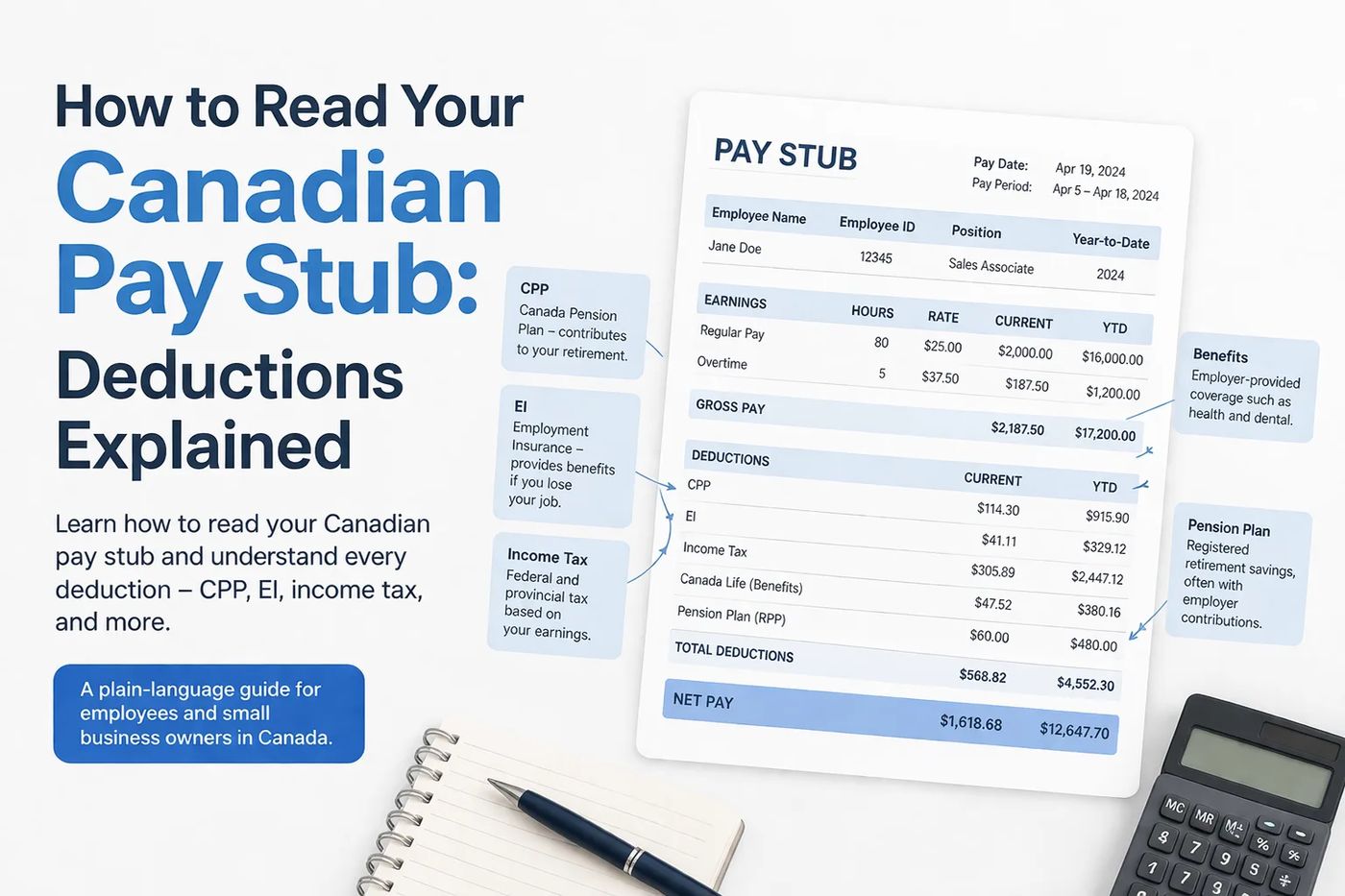
Federal and provincial income taxes are the largest deductions for most employees. Canada uses a progressive tax system, meaning your income is taxed at increasing rates as it enters higher brackets. Each province has its own parallel set of brackets and rates that are applied on top of the federal tax. Your total income tax is the sum of these two calculations, minus non-refundable tax credits like the basic personal amount. These credits reduce the amount of tax you owe, and the calculator includes them in its estimates.
The Canada Pension Plan is a mandatory contribution that funds retirement benefits. For 2026, employees contribute 5.95% of their pensionable earnings between a basic exemption of $3,500 and the yearly maximum pensionable earnings of $74,600. This results in a maximum employee contribution of approximately $4,230. A second tier, called CPP2, applies an additional 4% contribution on earnings between $74,600 and a second ceiling of $85,000. Employers match these contributions dollar for dollar. In Quebec, the Quebec Pension Plan operates with similar but not identical parameters. The calculator automatically applies the correct CPP or QPP rates based on your province and income.
Employment Insurance premiums are deducted to fund temporary income support for unemployed workers. The 2026 EI rate is 1.63% of insurable earnings, up to an annual maximum premium of about $1,123. Quebec uses a lower federal EI rate because the province administers its own parental insurance plan, the Quebec Parental Insurance Plan. Workers in Quebec pay into QPIP instead of the federal EI program for parental benefits. The salary calculator adjusts the EI deduction based on the province you select, ensuring an accurate estimate of this payroll deduction.
Provincial Comparison of Take-Home Pay
Your net income varies considerably depending on where you live in Canada due to differing provincial tax rates and policies. The same gross salary results in different after-tax amounts across provinces. For example, an $80,000 annual salary in 2026 yields a take-home pay of approximately $61,157 in British Columbia but only about $56,439 in Nova Scotia, a difference of nearly $4,800. This disparity is primarily due to provincial income tax rates and the value of provincial basic personal amounts. Alberta, with its high basic personal amount and single-rate tax system, is often the most advantageous province for higher earners. The table below illustrates the annual take-home pay, monthly pay, and total deductions for a single employee with no additional credits earning $80,000 in 2026 across six provinces.
These figures are estimates based on standard CRA and provincial tax rates. This comparison highlights the importance of using a salary calculator with your specific province to understand your real earnings. A calculator accounts for all provincial variables, including unique programs like QPIP in Quebec. It will give you a precise figure for your take-home pay after federal tax, provincial tax, CPP or QPP, and EI premiums. The results are approximate and based on simplified assumptions.
Converting Between Hourly Wage and Annual Salary
Many Canadian workers are paid hourly, and converting that wage to an annual salary is a common calculation. The fundamental formula is to multiply your hourly rate by the number of hours you work in a year. A standard full-time year consists of 2,080 hours, which assumes 40 hours per week for 52 weeks. For example, an hourly wage of $25 multiplied by 2,080 hours equals an annual salary of $52,000. However, your personal situation may differ. If you work a 37.5-hour week, your yearly hours are 1,950. If you have two weeks of unpaid leave, your working year is 2,000 hours. A salary calculator allows you to input your exact weekly hours and weeks worked per year for a personalized conversion.
Vacation pay is a critical factor in this conversion for hourly employees. Employment standards in every province require employers to pay at least 4% of gross wages as vacation pay, which is roughly equivalent to two weeks of pay. Many employers increase this to 6% after five years of service. If you receive statutory vacation pay, you are effectively paid for 52 weeks a year even when you take time off. Therefore, when using a calculator, you should typically keep the weeks per year setting at 52 if you receive vacation pay. This ensures your annual salary estimate reflects your total compensation, not just your active working hours. The calculator will then show your adjusted hourly wage, which is your effective pay per hour worked after accounting for paid time off.
Important Deadlines and Record-Keeping Rules
Understanding tax deadlines is crucial for all Canadian income earners. The deadline to file your 2025 income tax return in 2026 is midnight on April 30, 2026. If you or your spouse are self-employed, your filing deadline is June 15, 2026, although any taxes owed are still due by April 30. Missing these deadlines can result in penalties and interest charges. After filing, the Canada Revenue Agency aims to issue refunds within two weeks for returns filed electronically via NETFILE. For paper returns mailed to the CRA, the processing time is approximately eight weeks from receipt. These timelines apply only to returns received on or before the due date.
The CRA mandates that you keep supporting documents for your income tax returns for a minimum of six years. This includes receipts, pay stubs, T4 slips, and records of deductions. If you file a return late, you must keep your records for six years from the date you filed that late return. Since you can request a change to your tax return for up to ten years, it is prudent to keep your important financial records for at least a decade. Proper record-keeping is essential if the CRA reviews your return and you need to substantiate your claims. The list below outlines key deadlines and retention periods based on CRA rules.
- Tax filing deadline for most individuals: April 30, 2026 (for the 2025 tax year).
- Tax filing deadline for self-employed individuals: June 15, 2026.
- Electronic refund processing goal: Within 2 weeks via NETFILE.
- Paper return refund processing: Within 8 weeks of CRA receipt.
- Minimum record retention period: 6 years by law.
- Adjustment request period: Up to 10 years.
- Tax payment methods: Online via CRA My Payment, pre-authorized debit, or third-party providers.
Worked Example Using 2026 Figures
Consider a single employee living in Ontario with an annual salary of $65,000 in 2026. To estimate their take-home pay, the salary calculator will apply the federal and Ontario tax brackets for that year. It will first subtract the federal basic personal amount and other non-refundable credits. Next, it will calculate Ontario provincial tax using its own brackets and basic personal amount. After income tax, the calculator deducts CPP contributions. For 2026, CPP is 5.95% of pensionable earnings between $3,500 and $74,600.
The final mandatory deduction is Employment Insurance. The 2026 EI rate is 1.63% on insurable earnings up to a maximum. After summing all deductions, federal tax, Ontario tax, CPP, and EI, the calculator arrives at the net annual income. For this Ontario example, the estimated take-home pay is approximately $50,556, which translates to roughly $4,213 per month. This example demonstrates how a salary calculator processes each input using the specific rules and rates for the selected year and province to provide a clear picture of after-tax earnings.
Frequently asked questions
How is take-home pay calculated in Canada?
Take-home pay, or net income, is calculated by starting with your gross salary or wages and subtracting mandatory payroll deductions. These deductions include federal income tax, provincial or territorial income tax, Canada Pension Plan or Quebec Pension Plan contributions, and Employment Insurance premiums. The calculation uses progressive tax brackets, so different portions of your income are taxed at different rates. Non-refundable tax credits, like the basic personal amount, are applied to reduce your tax payable. Online salary calculators automate this process using the latest rates and brackets for your selected province and tax year.
What is the difference between CPP and CPP2?
The Canada Pension Plan has a primary contribution and a second-tier contribution. For 2026, the primary CPP contribution is 5.95% of your pensionable earnings between a basic exemption of $3,500 and the yearly maximum pensionable earnings of $74,600. CPP2 is an additional contribution that applies to higher earners. It is a rate of 4% on earnings between the first ceiling of $74,600 and a second ceiling of $85,000. Both you and your employer contribute equal amounts to CPP and CPP2. These contributions fund enhanced retirement, disability, and survivor benefits under the expanded CPP program.
Why does my net pay change depending on my province?
Your net pay varies by province because each province and territory sets its own income tax brackets, rates, and basic personal amounts. Some provinces, like Alberta, have a single tax rate and a high basic personal amount, which can result in higher take-home pay. Quebec operates its own pension plan and parental insurance system, leading to different deduction rates. Provincial policies directly impact the amount of provincial tax withheld from your paycheque. Therefore, the same gross salary will yield different after-tax amounts across Canada, making it essential to use a calculator that incorporates your specific province of residence.
How do I convert my hourly wage to a yearly salary?
To convert an hourly wage to a yearly salary, multiply your hourly rate by the number of hours you work in a year. A standard full-time year is 2,080 hours, based on 40 hours per week for 52 weeks. If your schedule differs, adjust the numbers accordingly. For example, a 37.5-hour work week results in 1,950 yearly hours. Remember to account for paid time off. If you receive vacation pay, you are paid for weeks you are not working, so you should typically use 52 weeks in your calculation. Online calculators simplify this by allowing you to input your hourly wage, weekly hours, and weeks per year for an instant annual salary estimate.
When is the deadline to file my 2025 tax return?
The deadline to file your 2025 income tax return is April 30, 2026. If you or your spouse are self-employed, the filing deadline is June 15, 2026. However, any balance owing for the 2025 tax year is still due on April 30, 2026, regardless of your filing status. Filing or paying after these dates can result in penalties and interest charges. The Canada Revenue Agency encourages electronic filing through NETFILE for faster processing, with a goal of issuing refunds within two weeks for returns filed online and on time.
Sources and further reading
- 2026 Canada Income Tax Calculator wealthsimple.com
- Hourly to Salary Calculator Canada 2026 waypointbudget.com
- 2025-26 Canada Income Tax Calculator turbotax.intuit.ca
- Annual Salary Calculator (2024 to 2026): Gross & After‑Tax wowa.ca
- Canadian Payroll & Take-Home Pay Calculator 2026 ... canpayinsights.ca
This article explains how things work and is not financial, tax or legal advice. Rules, limits and rates change, so check the current figures with the Canada Revenue Agency, your province or your financial institution before you act.